How I Learned to Stop Worrying and Love the Token Limit
Cut through the hype, understand how it actually works and what it is


So, you've been chatting with Claude (or ChatGPT or Ollama or (omg there are too many of these things please make it stop) AI flavour of the month), and suddenly you catch it slipping up, telling you things that aren't true, or even incorrectly referenced from stuff you told it just two prompts earlier! Sound familiar? Welcome to the wacky world of AI context, in this article, I'll go through and explain how it works, and more importantly, steps you can do to improve it's usage and have a much nicer time working with your LLM's.
What Actually Is This "Token" Thing Everyone Keeps Talking About?
First things first, let me give you an explanation of what a context is made up of: tokens. Think of a token as roughly ¾ of an average word. So when you type "Hello world," you're looking at roughly 2.5 tokens. This is how an LLM breaks down everything you give it, tokens aren't just an arbitrary value we get after watching the AI yap on for a while, it's a value to showcase the number value that is assigned to all the words that are fed into it, an LLM uses what's called a Transformer (If you linked this to the T in ChatGPT you're a wizard btw) to turn natural language (and even numbers, spaces and punctuation) into numerical representation called a vector.

Now besides trying to steal the moon, a vector can be used to represent how closely that word or even phrase (multiple vectors associated to one another by how close their values match) is related to things, but it doesn't just calculate this only once when you insert it, no it actually does this calculation for every token every time you enter a new prompt!
These little tokens are like moths to a flame, each time you enter a new prompt, all tokens are recalculated to see how closely they relate to what you've said or asked it to, the closer they match, the closer the moth flies to that proverbial flame, the AI uses to more accurately give answers that are relevant to users.
versions (questions) of your prompt to get a wider range of what might be relevant depending on what it wants to reply with (even this explanation has to be abbreviated, but I hope you understand how it gets more and more complex)The Mind-Blowing Scale of Modern AI Memory
Now given what you know about how a token works, let's start getting into the actual scale of LLM's with that in mind and putting it into metrics we can understand a bit better, here are a few modern models and their context windows (+ what that relates to roughly in word equivalents):
- GPT-4 Turbo: 128K tokens (that's about 96,000 words)
- Claude 4 Sonnet: 256K tokens (roughly 192,000 words)
- Gemini 2.5 Pro: 1M tokens (a whopping 750,000 words)
To put this in perspective: 128K tokens is literally the entire length of Tolkien's "The Hobbit"

And 256K tokens? That's two Hobbit books or one Moby Dick.

And that 1M token monster? We're talking about the entire Bible.

I remember when a 4K context window felt revolutionary. Now we're casually throwing around context windows that can hold the equivalent words that I have on my bookshelf. Wild.
so much power!! but it's definitely one of them, they are some of the most advanced machines on the planet.How Your AI Actually "Pays Attention" (Spoiler: It's Complicated)
Remember how I was explaining that on every prompt the LLM recalculates all of it's tokens to best see what matters to your prompt? The technical term for this is called self-attention , and it's one of the big reasons it gets so expensive to run such large models, those calculations cost ALOT, but there is a simple way we can save costs on these expensive calculations. By caching the results!
We even assign a nice name to this cache:
The KV Cache
- Query (Q): "What am I looking for?"
- Key (K): "What am I about?"
- Value (V): "The content you'll take from me if I'm relevant"
Now I know it's called the KV cache but I just listed QKV there, but the query Q is what the AI uses to look through the cache itself, not actually stored, but still very relevant.
retrieve the calculations, rather than doing them every time! Makes it much faster for the model to start drafting its response.The Dreaded "Lost in the Middle" Effect
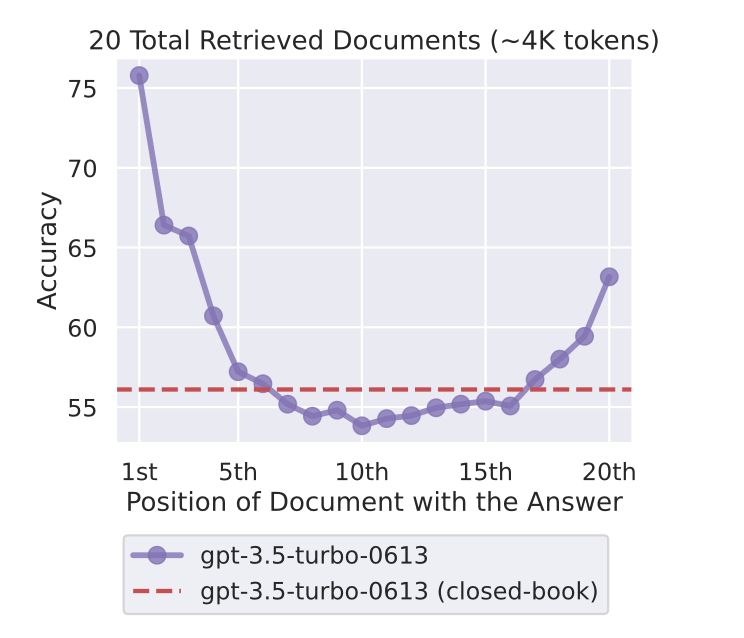
So far I'm sure the complex and fascinating beast that is the model context-window has seemed amazing, but it has its flaws… This usually rears its ugly head right when the context window starts to grow, to understand why this is, we have to first understand the lost in the middle concept when it comes to LLM's.
Again, remember me talking about how a token is calculated on every prompt call for relevancy to the current question? Well, the recency of when that token was entered into the context plays a large factor as to how high it will rank amongst other tokens, causing the ends of prompts of pieces of information to be taken into higher regard, on top of this.
It seems that scientists have discovered that models are self-developing what they (the scientiests lol) have dubbed an attention sink , this is when a model transformer assigns extra value to the beginning of prompts, they're not entirely sure why it happens it seems, but the only thing that's important for us is that it does happen.

So, if we were to plot a models' attention span on a curve, the highest attention spans would at it's beginning and end, leaving a cliff drop at the center of it, a u-shaped type of curve here. This is the main reason of the lost in the middle effect if you hide key information in the middle of a very large prompt, the LLM will see it, but not have the attention-span to give it the proper attention it needs for your question.
When Attention Sink Emerges in Language Models: An Empirical ViewContext Rot: The Slow Death of Long Conversations
Another related problem to adding more tokens to the context is known as context rot, a name coined by researchers at chroma DB, it does relate still to the u-shaped curve I showed you earlier, but adds another level of explanation to why the attention spans get so bad.
Essentially, the more context you add the more clutter you add to the context, if we go back to my moth to a flame metaphor from earlier, sure we still have certain moths going closer to the flame as they are more relevant, but now instead of 10 moths circulating close to the flame, you have 100 additional moths flying close behind them, it makes it difficult for the model to be accurate as it has so much more context to refer to without accidentally picking the wrong one.
The moral of the story? Don't be afraid to start new conversations frequently. I know it feels inefficient, but sometimes a fresh start is exactly what your AI assistant needs.
Enter Context Engineering: The Art of Not Confusing Your AI
I've been going through a lot of the technical gloom-and-doom of context, but let me introduce you to the art of managing such a complex beast: Context Engineering
Context engineering is the craft of packaging your input, so the model can't miss what matters. It's about being intentional with how you structure your prompts, instead of just throwing a wall of text at the AI and hoping for the best.
Here are the key principles I've learned through way too many late-night debugging sessions:
Use Structure in Your Prompts
Like XML or JSON to specify sections or variables. Don't leave things to interpretation. Make sure your tags are explicit and clearly indicate what the text between them represents.
Placement Is Everything
The most important info should go first or last in your prompt. Those are the "sweet spots" where the attention mechanism is strongest. As I explained in the previous sections, ensure the most important information is in those two key sections, such as:
- The role of the AI
- The instructions for what to do with any data you give it
- The output structure
- Examples of the data for AI understanding
The simplest thing, clear the context often
It seems like such a simple solution, but we all forget to do it, we are often coding or constantly asking ChatGPT questions that we don't really take the time to start a new chat or use helpful functions in tools like Claude Code to /compact or /clear the context to ensure we're getting a fresh new context!
With less context bogging things down, you'll see you're
A Real-World Example That Actually Works
Here's an example from Anthropic themselves, it is for a financial analyst.
You’re a financial analyst at AcmeCorp. Generate a Q2 financial report for our investors.

AcmeCorp is a B2B SaaS company. Our investors value transparency and actionable insights.

Use this data for your report:<data>{{SPREADSHEET_DATA}}</data>

<instructions>
1. Include sections: Revenue Growth, Profit Margins, Cash Flow.
2. Highlight strengths and areas for improvement.
</instructions>

Make your tone concise and professional. Follow this structure:
<formatting_example>{{Q1_REPORT}}</formatting_example>
You can see the important parts of the prompt immediately by looking at the XML tags <data>, <instructions> and <formatting_example> it's easy for us to see it, and more importantly it's even better for the AI to get clear examples of what it's looking at and what it needs to do.
solve the lost in the middle problem, but it helps mitigate it as much as possible when you're working on something using LLM'sAn oldie but a goodie RAG-it
It feels weird calling RAG old but thanks to how fast things move, it genuinely might be, we have people all over writing articles about how RAG is dead! Long live the large contexts! , but as you might've ascertained from the rest of this article, context is fragile when used with too much extensive information.
So why not use RAG? If you have very large documents, you don't really need the entire document to be loaded in to ask a specific question, you only need relevant exerpts of it, RAG is probably the best choice to be able to load this into context, it performs amazing semantic searches (Not too unsimilar from how the LLM uses context!), and thanks to the growing context length of models, we can fit even more info from the RAG pipeline into our searches.

A few useful resources that help encompass all I mentioned to fix these issues
After countless hours of wrestling with context limits, here are my hard-won insights:
Use pre-defined prompts, stop writing massive XML structures every time. Create a good prompt once, test it, and allow for user input within that framework. Future you will thank past you.
Leverage Claude Agents – You can spin up multiple specialized agents in parallel, each with their own context. This means less need to start fresh conversations constantly.
Track your context usage – Use /context to see how much of your limit you've burned through. When you hit around 40%, consider starting fresh.
Start new conversations proactively – Especially when you find yourself having to correct Claude's code repeatedly. That's usually a sign that context rot has set in.
The Bottom Line
Context engineering isn't just about understanding tokens and attention mechanisms (though that helps). It's about recognizing that these AI systems, for all their apparent intelligence, are fundamentally pattern-matching machines with very specific quirks and limitations.
The magic happens when you learn to work WITH these limitations instead of against them. Structure your prompts intentionally, place important information strategically, and don't be afraid to start fresh when things get muddy.
And remember: every time Claude starts agreeing with everything you say or giving you responses that feel off, it might not be having an existential crisis. It might just need a context refresh and some better prompt engineering.
Now go forth and engineer some context like the prompt wizard you were meant to be. Your future conversations will thank you.